VSCode 格式化缩进代码的实现
时间:2020-08-06 16:00:03 | 栏目: | 点击:次
1)文件 ―> 首选项
因为 VsCode 默认启用了根据文件类型自动设置tabsize的选项,在设置中添加:
"editor.detectIndentation": false
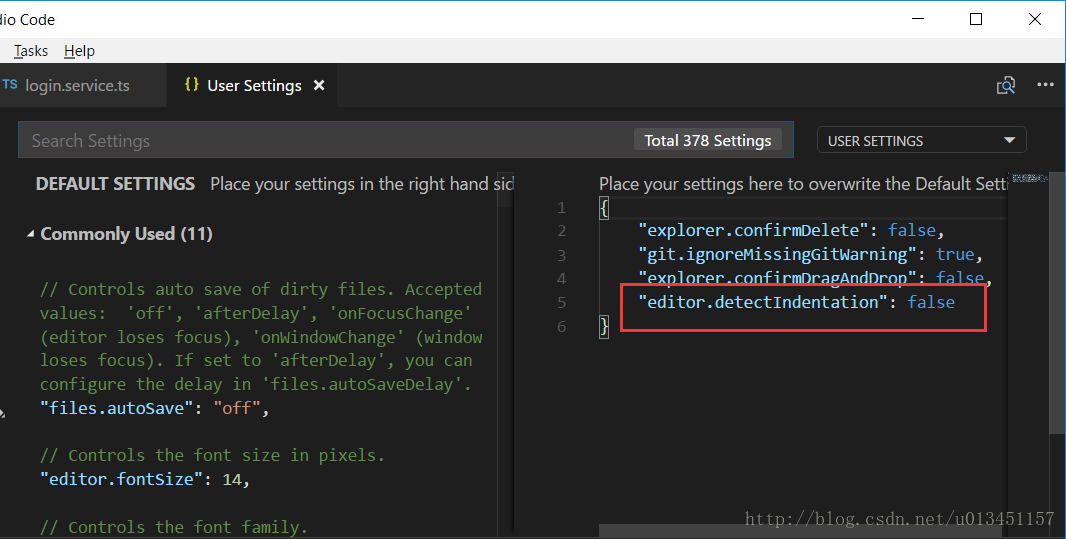
2)编辑器配置
在项目文件中新建 .editorconfig 文件
为特定类型文件指定缩进大小、缩进类型(空格,或tab),是否自动插入末行等等。
root = true

[*]
charset = utf-8
indent_style = tab
indent_size = 4
insert_final_newline = true
trim_trailing_whitespace = true

[*.md]
max_line_length = off
trim_trailing_whitespace = false
3)安装 VsCode 格式化代码插件
搜索并安装 Beautify 格式化代码插件
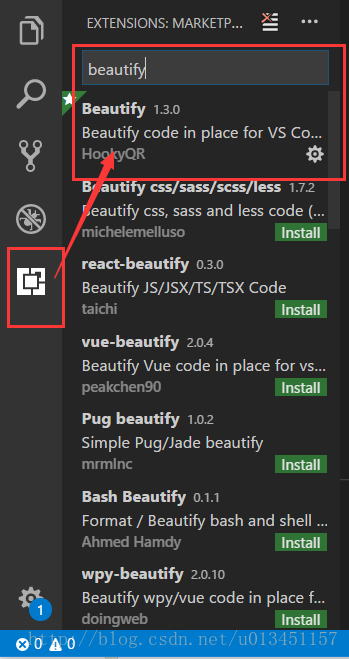
使用指南:
打开要格式化的文件 ―> F1 ―> Beautify file ―> 选择你要格式化的代码类型
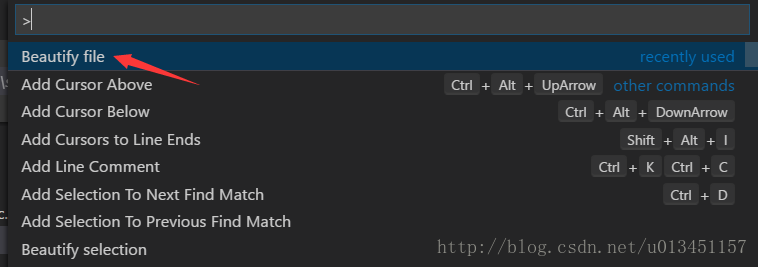

4)格式化对齐快捷键:
- Windows: Ctrl + K + F
- Windows:Shift + Alt + F
- Mac: Shift + Option + F
- Ubuntu: Ctrl + Shift + I