


鸿蒙开发之Button按钮类型及如何通过代码设置(HarmonyOS鸿蒙开发基础知识)
时间:2020-09-14 12:00:20|栏目:|点击: 次


AbilitySlice 是什么 (HarmonyOS鸿蒙开发基础知识)
AbilitySlice 是什么
AbilitySlice主要用于承载Ability的具体逻辑实现和界面UI,是应用显示、运行和跳转的最小单元。AbilitySlice通过setUIContent()为界面设置布局
本文重点给大家介绍鸿蒙开发之Button按钮类型及如何通过代码设置(HarmonyOS鸿蒙开发基础知识),具体内容如下所示:
Button类型分类
按照按钮的形状,按钮可以分为:
- 普通按钮
- 椭圆按钮
- 胶囊按钮
- 圆形按钮
- 其它
Button类型效果和代码
普通按钮
普通按钮和其他按钮的区别在于不需要设置任何形状,只设置文本和背景颜色即可,例如:
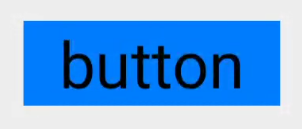
<Button
 ohos:width="150vp"
 ohos:height="50vp"
 ohos:text_size="27fp"
 ohos:text="button"
 ohos:background_element="$graphic:color_blue_element"
 ohos:left_margin="15vp"
 ohos:bottom_margin="15vp"
 ohos:right_padding="8vp"
 ohos:left_padding="8vp"
/>
椭圆按钮
椭圆按钮是通过设置background_element的来实现的,background_element的shape设置为椭圆(oval),例如:

<Button
 ohos:width="150vp"
 ohos:height="50vp"
 ohos:text_size="27fp"
 ohos:text="button"
 ohos:background_element="$graphic:oval_button_element"
 ohos:left_margin="15vp"
 ohos:bottom_margin="15vp"
 ohos:right_padding="8vp"
 ohos:left_padding="8vp"
 ohos:element_left="$graphic:ic_btn_reload"
/>
胶囊按钮
胶囊按钮是一种常见的按钮,设置按钮背景时将背景设置为矩形形状,并且设置ShapeElement的radius的半径,例如:
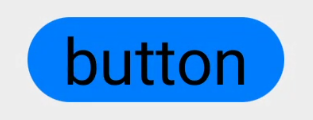
<Button
 ohos:id="$+id:button"
 ohos:width="match_content"
 ohos:height="match_content"
 ohos:text_size="27fp"
 ohos:text="button"
 ohos:background_element="$graphic:capsule_button_element"
 ohos:left_margin="15vp"
 ohos:bottom_margin="15vp"
 ohos:right_padding="15vp"
 ohos:left_padding="15vp"
/>
圆形按钮
圆形按钮和椭圆按钮的区别在于组件本身的宽度和高度需要相同,例如:

<Button
 ohos:id="$+id:button4"
 ohos:width="50vp"
 ohos:height="50vp"
 ohos:text_size="27fp"
 ohos:background_element="$graphic:circle_button_element"
 ohos:text="+"
 ohos:left_margin="15vp"
 ohos:bottom_margin="15vp"
 ohos:right_padding="15vp"
 ohos:left_padding="15vp"
/>
场景示例
利用圆形按钮,胶囊按钮,文本组件可以绘制出如下拨号盘的UI界面。
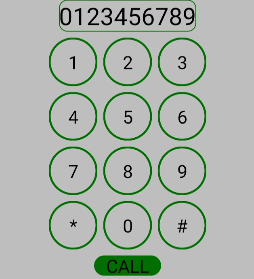
<?xml version="1.0" encoding="utf-8"?>
<DirectionalLayout
 xmlns:ohos="http://schemas.huawei.com/res/ohos"
 ohos:width="match_parent"
 ohos:height="match_parent"
 ohos:background_element="$graphic:color_light_gray_element"
 ohos:orientation="vertical">
 <Text
 ohos:width="match_content"
 ohos:height="match_content"
 ohos:text_size="20fp"
 ohos:text="0123456789"
 ohos:background_element="$graphic:green_text_element"
 ohos:text_alignment="center"
 ohos:layout_alignment="horizontal_center"
 />
 <DirectionalLayout
 ohos:width="match_parent"
 ohos:height="match_content"
 ohos:alignment="horizontal_center"
 ohos:orientation="horizontal"
 ohos:top_margin="5vp"
 ohos:bottom_margin="5vp">
 <Button
  ohos:width="40vp"
  ohos:height="40vp"
  ohos:text_size="15fp"
  ohos:background_element="$graphic:green_circle_button_element"
  ohos:text="1"
  ohos:text_alignment="center"
 />
 <Button
  ohos:width="40vp"
  ohos:height="40vp"
  ohos:text_size="15fp"
  ohos:background_element="$graphic:green_circle_button_element"
  ohos:text="2"
  ohos:left_margin="5vp"
  ohos:right_margin="5vp"
  ohos:text_alignment="center"
 />
 <Button
  ohos:width="40vp"
  ohos:height="40vp"
  ohos:text_size="15fp"
  ohos:background_element="$graphic:green_circle_button_element"
  ohos:text="3"
  ohos:text_alignment="center"
 />
 </DirectionalLayout>
 <DirectionalLayout
 ohos:width="match_parent"
 ohos:height="match_content"
 ohos:alignment="horizontal_center"
 ohos:orientation="horizontal"
 ohos:bottom_margin="5vp">
 <Button
  ohos:width="40vp"
  ohos:height="40vp"
  ohos:text_size="15fp"
  ohos:background_element="$graphic:green_circle_button_element"
  ohos:text="4"
  ohos:text_alignment="center"
 />
 <Button
  ohos:width="40vp"
  ohos:height="40vp"
  ohos:text_size="15fp"
  ohos:left_margin="5vp"
  ohos:right_margin="5vp"
  ohos:background_element="$graphic:green_circle_button_element"
  ohos:text="5"
  ohos:text_alignment="center"
 />
 <Button
  ohos:width="40vp"
  ohos:height="40vp"
  ohos:text_size="15fp"
  ohos:background_element="$graphic:green_circle_button_element"
  ohos:text="6"
  ohos:text_alignment="center"
 />
 </DirectionalLayout>
 <DirectionalLayout
 ohos:width="match_parent"
 ohos:height="match_content"
 ohos:alignment="horizontal_center"
 ohos:orientation="horizontal"
 ohos:bottom_margin="5vp">
 <Button
  ohos:width="40vp"
  ohos:height="40vp"
  ohos:text_size="15fp"
  ohos:background_element="$graphic:green_circle_button_element"
  ohos:text="7"
  ohos:text_alignment="center"
 />
 <Button
  ohos:width="40vp"
  ohos:height="40vp"
  ohos:text_size="15fp"
  ohos:left_margin="5vp"
  ohos:right_margin="5vp"
  ohos:background_element="$graphic:green_circle_button_element"
  ohos:text="8"
  ohos:text_alignment="center"
 />
 <Button
  ohos:width="40vp"
  ohos:height="40vp"
  ohos:text_size="15fp"
  ohos:background_element="$graphic:green_circle_button_element"
  ohos:text="9"
  ohos:text_alignment="center"
 />
 </DirectionalLayout>
 <DirectionalLayout
 ohos:width="match_parent"
 ohos:height="match_content"
 ohos:alignment="horizontal_center"
 ohos:orientation="horizontal"
 ohos:bottom_margin="5vp">
 <Button
  ohos:width="40vp"
  ohos:height="40vp"
  ohos:text_size="15fp"
  ohos:background_element="$graphic:green_circle_button_element"
  ohos:text="*"
  ohos:text_alignment="center"
 />
 <Button
  ohos:width="40vp"
  ohos:height="40vp"
  ohos:text_size="15fp"
  ohos:left_margin="5vp"
  ohos:right_margin="5vp"
  ohos:background_element="$graphic:green_circle_button_element"
  ohos:text="0"
  ohos:text_alignment="center"
 />
 <Button
  ohos:width="40vp"
  ohos:height="40vp"
  ohos:text_size="15fp"
  ohos:background_element="$graphic:green_circle_button_element"
  ohos:text="#"
  ohos:text_alignment="center"
 />
 </DirectionalLayout>
 <Button
 ohos:width="match_content"
 ohos:height="match_content"
 ohos:text_size="15fp"
 ohos:text="CALL"
 ohos:background_element="$graphic:green_capsule_button_element"
 ohos:bottom_margin="5vp"
 ohos:text_alignment="center"
 ohos:layout_alignment="horizontal_center"
 ohos:left_padding="10vp"
 ohos:right_padding="10vp"
 ohos:top_padding="2vp"
 ohos:bottom_padding="2vp"
 />
</DirectionalLayout>
总结
上一篇:java安全编码指南之:Mutability可变性详解
栏 目:
本文标题:鸿蒙开发之Button按钮类型及如何通过代码设置(HarmonyOS鸿蒙开发基础知识)
本文地址:http://www.codeinn.net/misctech/4940.html

