


使用Mybatis的PageHelper分页工具的教程详解
时间:2020-09-02 11:00:16|栏目:|点击: 次


1、导入相关的jar包
在pom.xm中加入
<!-- https://mvnrepository.com/artifact/com.github.pagehelper/pagehelper -->
  <dependency>
   <groupId>com.github.pagehelper</groupId>
   <artifactId>pagehelper</artifactId>
   <version>5.1.10</version>
  </dependency>
2、在Mybatis的配置文件mybatis-config.xml中加入以下代码
<plugins>
    <!-- com.github.pagehelper为PageHelper类所在包名 -->
    <plugin interceptor="com.github.pagehelper.PageInterceptor">
      <!-- 使用下面的方式配置参数,后面会有所有的参数介绍 -->
      <property name="reasonable" value="true"/>
    </plugin>
  </plugins>
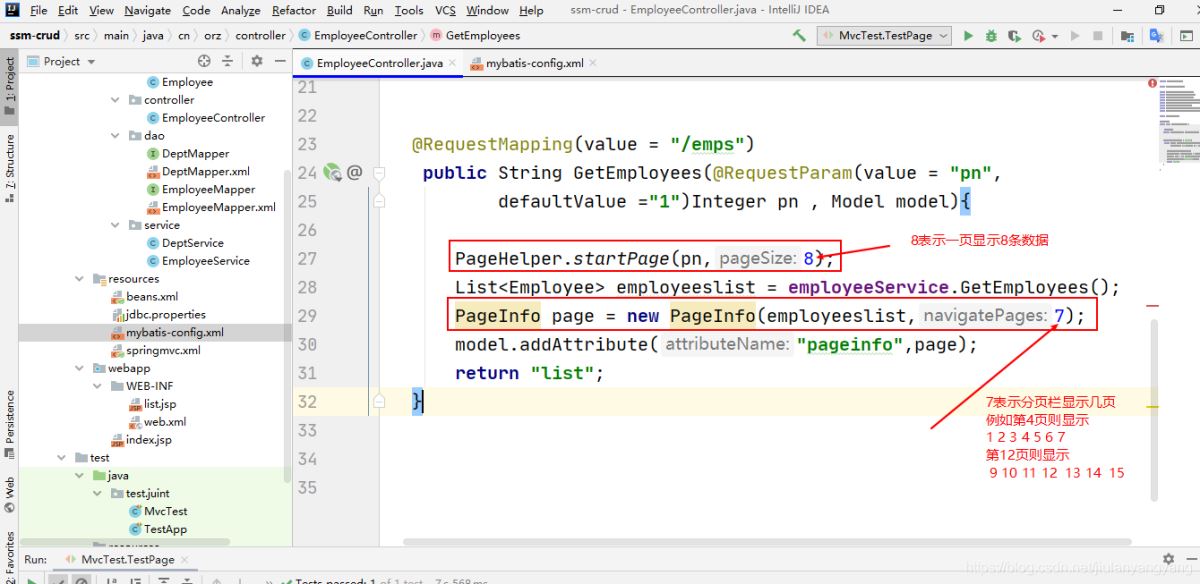
在controller中编写代码引用
 @RequestMapping(value = "/emps")
   public String GetEmployees(@RequestParam(value = "pn",
      defaultValue ="1")Integer pn , Model model){

    PageHelper.startPage(pn,8);
    List<Employee> employeeslist = employeeService.GetEmployees();
    PageInfo page = new PageInfo(employeeslist,7);
    model.addAttribute("pageinfo",page);
    return "list";
  }
PS:下面看下PageHelper的简单使用(强大的分页工具)
1.使用maven解决依赖
 <dependency>
  <groupId>com.github.pagehelper</groupId>
  <artifactId>pagehelper</artifactId>
  <version>3.4.2</version>
 </dependency>
2.在Controller调用Service的时候,调用PageHelper
@RequestMapping("/sysadmin/dept/list")
 public String toDeptList(Model model,@RequestParam(required = false,defaultValue = "1",value = "pn")Integer pn ) {
 PageHelper.startPage(pn, 8);
 List<Dept> deptList = deptService.findAll();
 PageInfo<Dept> p = new PageInfo<>(deptList);
 model.addAttribute("deptList", deptList);
 model.addAttribute("page", p);
 return "sysadmin/dept/jDeptList";

 }
PageHelper.startPage(pn, 8); //参数分别是设置当前的页数和每页的数量
PageInfo<Dept> p = new PageInfo<>(deptList); //将得到查询结果集进行封装
3.在jsp页面进行简单的分页
<a href="/sysadmin/dept/list?pn=${page.firstPage}" rel="external nofollow" >首页</a>
<c:if test="${page.hasPreviousPage}"><a href="/sysadmin/dept/list?pn=${page.prePage}" rel="external nofollow" >上一页</a></c:if>
<c:if test="${!page.hasPreviousPage}">上一页</c:if>

<c:if test="${page.hasNextPage}"><a href="/sysadmin/dept/list?pn=${page.nextPage}" rel="external nofollow" >下一页</a></c:if>
<c:if test="${! page.hasNextPage}">下一页</c:if>

<a href="/sysadmin/dept/list?pn=${page.lastPage}" rel="external nofollow" >最后页</a>
<p>一共${page.pages}页 --当前页是${page.pageNum } -- 共有${page.total }条数据</p>
简单的进行了调用,实现了基本的功能(使用pageInfo的相关属性)
总结

