


vue实现移动端H5数字键盘组件使用详解
时间:2020-08-21 19:00:07|栏目:|点击: 次


本文实例为大家分享了vue实现移动端H5数字键盘组件的使用代码,供大家参考,具体内容如下
我们平时扫码付款的时候,经常会输入一些数字进行付款,仔细看了下键盘和系统的键盘有点不一样,于是今天买甘蔗的时候扫码付款就想了一下要怎么去实现一个。话不多说,直接上代码。
结果如下:
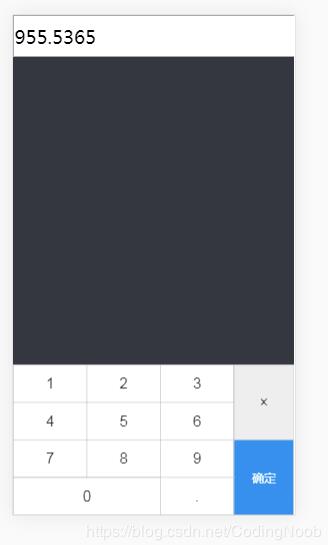
代码如下:
<template>
 <div class="keyboard-wrapper">
  <input type="text" v-model="NUM" @focus="show = true" onfocus="this.blur()"/>
  <div class="keyboard" v-if="show">
   <div class="num">
    <table>
     <tr>
      <td @click="change(1)" :class="[active === 1 ? 'active' : '']" @touchstart="msDown(1)" @touchend="msUp(1)">1</td>
      <td @click="change(2)" :class="[active === 2 ? 'active' : '']" @touchstart="msDown(2)" @touchend="msUp(2)">2</td>
      <td @click="change(3)" :class="[active === 3 ? 'active' : '']" @touchstart="msDown(3)" @touchend="msUp(3)">3</td>
      <td rowspan="2" class="del" @click="del">×</td>
     </tr>
     <tr>
      <td @click="change(4)" :class="[active === 4 ? 'active' : '']" @touchstart="msDown(4)" @touchend="msUp(4)">4</td>
      <td @click="change(5)" :class="[active === 5 ? 'active' : '']" @touchstart="msDown(5)" @touchend="msUp(5)">5</td>
      <td @click="change(6)" :class="[active === 6 ? 'active' : '']" @touchstart="msDown(6)" @touchend="msUp(6)">6</td>
     </tr>
     <tr>
      <td @click="change(7)" :class="[active === 7 ? 'active' : '']" @touchstart="msDown(7)" @touchend="msUp(7)">7</td>
      <td @click="change(8)" :class="[active === 8 ? 'active' : '']" @touchstart="msDown(8)" @touchend="msUp(8)">8</td>
      <td @click="change(9)" :class="[active === 9 ? 'active' : '']" @touchstart="msDown(9)" @touchend="msUp(9)">9</td>
      <td rowspan="2" class="comfirm" @click="comfirm">确定</td>
     </tr>
     <tr>
      <td colspan="2" @click="change(0)" :class="[active === 0 ? 'active' : '']" @touchstart="msDown(0)" @touchend="msUp(0)">0</td>
      <td colspan="1" @click="change('.')" :class="[active === '.' ? 'active' : '']" @touchstart="msDown('.')" @touchend="msUp('.')">.</td>
     </tr>
    </table>
   </div>
  </div>
 </div>
</template>

<script>

export default {
 name: 'App',
 data () {
  return {
   active: null,
   show: false,
   NUM: '',
   result: []
  };
 },
 computed: {
  // 统计打中的地鼠数量
  num: function () {
   return this.result.join('');
  }
 },
 created () {
 },
 mounted () {
 },
 methods: {
  msDown (v) {
   this.active = v;
  },
  msUp (v) {
   this.active = '';
  },
  stopInput () {
   return false;
  },
  change (val, $event) {
   if (this.result.length === 0 && val === '.') {
    return false;
   } else {
    this.result.push(val);
    this.NUM = this.result.join('');
   }
  },
  del () {
   this.result.pop();
   this.NUM = this.result.join('');
   this.$emit('del', this.NUM);
  },
  comfirm () {
   this.$emit('comfirm', this.NUM);
   this.show = false;
  }
 }
};
</script>
<style lang="less" scoped>
.keyboard-wrapper {
 user-select: none;
 input {
  width:100%;
  height:50px;
  font-size:25px;
 }
 .keyboard {
  position: fixed;
  bottom: 0;
  width: 100%;
  .num {
   table {
    width: 100%;
    border: 1px solid #ccc;
    border-collapse: collapse;
    background: #fff;
    td {
     height: 50px;
     vertical-align: middle;
     color: #333;
     font-size: 20px;
     border: 1px solid #ccc;
     text-align: center;
    }
    td.active{
     background:#ccc;
    }
    .del {
     background: #eee;
    }
    .comfirm {
     font-size: 16px;
     width: 80px;
     background: #118eeb;
     color: #fff;
    }
   }
  }
 }
}
</style>
上一篇:探索浏览器页面关闭window.close()的使用详解
栏 目:
本文标题:vue实现移动端H5数字键盘组件使用详解
本文地址:http://www.codeinn.net/misctech/3894.html

