


Windows下DOS实现持续ping显示时间并保存日志
时间:2020-01-01 09:20:12|栏目:|点击: 次


Windows下DOS实现持续ping显示时间
DOS的脚本实现,部分电脑执行会卡死,按下ctrl+c后提示“过程试图写入的管道不存在。”,在其中加入cd\后部分电脑能正常运行,但兼容性还是不好。有些win7可以以管理员身份执行,就可以解决,但有些又不可以。
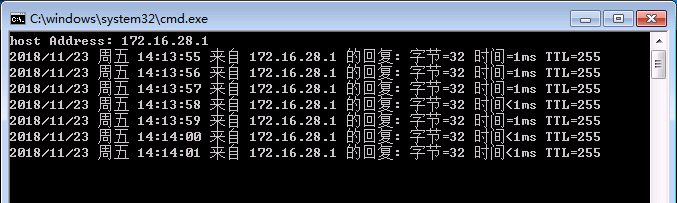
执行效果图:
Windows下Python实现持续ping显示时间
Python2.7的代码实现,用python实现就没有那么多兼容性问题了,还能跨平台
DOS的脚本实现,部分电脑执行会卡死,按下ctrl+c后提示“过程试图写入的管道不存在。”,在其中加入cd\后部分电脑能正常运行,但兼容性还是不好。有些win7可以以管理员身份执行,就可以解决,但有些又不可以。
@echo off

set /p host=host Address:
set logfile=Log_%host%.log
echo Target Host = %host% >%logfile%
for /f "tokens=*" %%A in ('ping %host% -n 1 ') do (echo %%A>>%logfile% && GOTO Ping)
:Ping
for /f "tokens=* skip=2" %%A in ('ping %host% -n 1 ') do (
    echo %date% %time:~0,2%:%time:~3,2%:%time:~6,2% %%A>>%logfile%
    echo %date% %time:~0,2%:%time:~3,2%:%time:~6,2% %%A
    timeout 1 >NUL
    GOTO Ping)
执行效果图:
Windows下Python实现持续ping显示时间
Python2.7的代码实现,用python实现就没有那么多兼容性问题了,还能跨平台
import os
import sys
import time
import subprocess
cur_path = os.path.split(os.path.realpath(__file__))[0]

hostname = raw_input("host ip or name:")


def pyping(ipaddress):
    cur_time = time.strftime('%Y_%m_%d-%H:%M:%S',time.localtime(time.time()))
    #ipaddress = '198.252.206.140'  # guess who
    proc = subprocess.Popen(
        ['ping', '-n', '1', ipaddress],
        stdout=subprocess.PIPE)
    stdout, stderr = proc.communicate()
    #if proc.returncode == 0:
        #print('{} is UP'.format(ipaddress))
    ping_ret ='T:%s, R:%s' % (cur_time, stdout.split("\n")[2])
    print ping_ret
    return ping_ret


log_path = cur_path + "\\%s_ping_log.txt" % hostname
with open(log_path, "a") as logfile:
    while 1:
        ret_ping = pyping(hostname)
        logfile.write(ret_ping+'\r\n')
        logfile.flush()
        time.sleep(1)
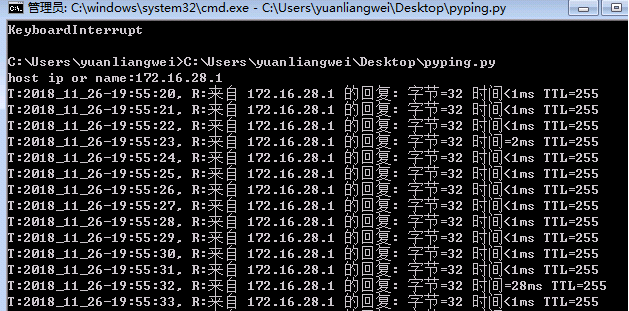
执行效果如下:
