


小程序view容器中文字上下居中、左右居中显示
时间:2019-11-26 09:01:18|栏目:|点击: 次


本文详细举例说明了在小程序view容器中文字上下居中、左右居中显示的方法,需要的朋友赶紧收藏吧。
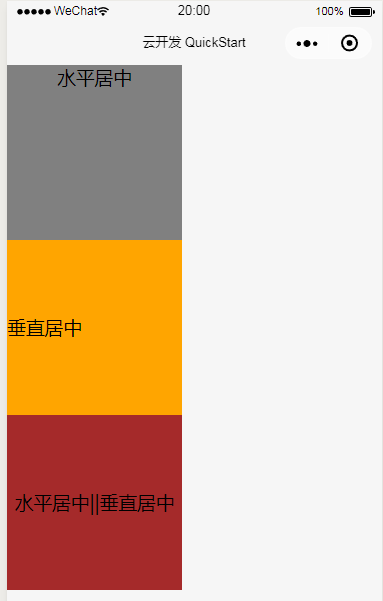
方法一、text-align、line-height
其中line-height的值必须等于容器的高度值。
.wxml代码:
<view class='text_align' >水平居中</view>
<view class='line_height' >垂直居中</view>
<view class='center' >水平居中||垂直居中</view>
.wxss代码:
.text_align{
  width: 350rpx;
  height: 350rpx;
  background-color: gray;
  text-align: center;   /** 水平居中 **/
}

.line_height{
  width: 350rpx;
  height: 350rpx;
  background-color: orange;
  line-height: 350rpx;  /** 垂直居中 **/
}

.center{
  width: 350rpx;
  height: 350rpx;
  background-color: brown;
  line-height: 350rpx;  /** 垂直居中 **/
  text-align: center;   /** 水平居中 **/
}
效果预览:
方法二、display flexible box模型
.wxml代码:
<view class='text_align' >水平居中</view>
<view class='line_height' >垂直居中</view>
<view class='center' >水平居中||垂直居中</view>
.wxss代码:
.text_align{
  width: 350rpx;
  height: 350rpx;
  background-color: gray;
  display: flex;
  flex-direction: column;
  justify-content: center;
  align-items: center;
}
.line_height{
  width: 350rpx;
  height: 350rpx;
  background-color: orange;
  line-height: 350rpx;  /** 垂直居中 **/
}
.center{
  width: 350rpx;
  height: 350rpx;
  background-color: brown;
  line-height: 350rpx;  /** 垂直居中 **/
  text-align: center;   /** 水平居中 **/
}
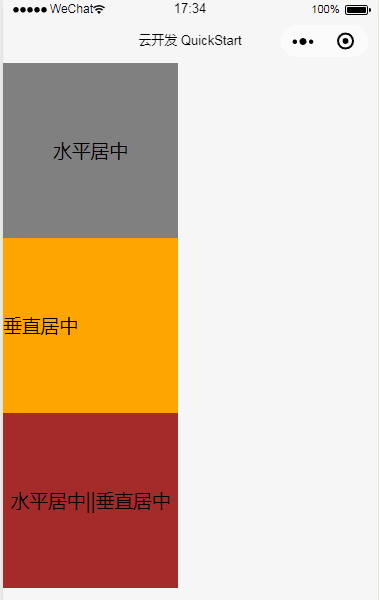
效果预览:
栏 目:
本文地址:http://www.codeinn.net/misctech/2164.html

