


java(包括springboot)读取resources下文件方式实现
时间:2021-06-01 08:53:29|栏目:JAVA代码|点击: 次


本文主要介绍了java(包括springboot)读取resources下文件方式实现,分享给大家,具体如下:
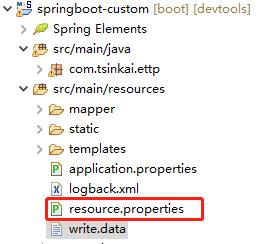
1、使用项目内路径读取,该路径只在开发工具中显示,类似:src/main/resources/resource.properties。只能在开发工具中使用,部署之后无法读取。(不通用)
File file = new File("src/main/resources/resource.properties");
@Test
 public void testReadFile2() throws IOException {
  File file = new File("src/main/resources/resource.properties");
  FileInputStream fis = new FileInputStream(file);
  InputStreamReader isr = new InputStreamReader(fis);
  BufferedReader br = new BufferedReader(isr);
  String data = null;
  while((data = br.readLine()) != null) {
   System.out.println(data);
  }

  br.close();
  isr.close();
  fis.close();
 }
2、使用org.springframework.util.ResourceUtils,读取。在linux环境中无法读取。(不通用)
File file = ResourceUtils.getFile("classpath:resource.properties");
FileInputStream fis = new FileInputStream(file);
@Test
 public void testReadFile3() throws IOException {
  File file = ResourceUtils.getFile("classpath:resource.properties");
  FileInputStream fis = new FileInputStream(file);
  InputStreamReader isr = new InputStreamReader(fis);
  BufferedReader br = new BufferedReader(isr);
  String data = null;
  while((data = br.readLine()) != null) {
   System.out.println(data);
  }

  br.close();
  isr.close();
  fis.close();
 }
3、使用org.springframework.core.io.ClassPathResource,各种环境都能读取。(通用)
Resource resource = new ClassPathResource("resource.properties");
InputStream is = resource.getInputStream();
@Test
 public void testReadFile() throws IOException {
//  ClassPathResource classPathResource = new ClassPathResource("resource.properties");
  Resource resource = new ClassPathResource("resource.properties");
  InputStream is = resource.getInputStream();
  InputStreamReader isr = new InputStreamReader(is);
  BufferedReader br = new BufferedReader(isr);
  String data = null;
  while((data = br.readLine()) != null) {
   System.out.println(data);
  }

  br.close();
  isr.close();
  is.close();
 }
4、结合spring注解,使用org.springframework.core.io.ResourceLoader;类的注解。(通用)
package com.tsinkai.ettp;

import java.io.BufferedReader;
import java.io.IOException;
import java.io.InputStream;
import java.io.InputStreamReader;

import org.junit.Test;
import org.junit.runner.RunWith;
import org.springframework.beans.factory.annotation.Autowired;
import org.springframework.boot.test.context.SpringBootTest;
import org.springframework.core.io.Resource;
import org.springframework.core.io.ResourceLoader;
import org.springframework.test.context.junit4.SpringRunner;

@RunWith(SpringRunner.class)
@SpringBootTest
public class EttpCustomApplicationTests {

 @Autowired
 ResourceLoader resourceLoader;


 @Test
 public void testReaderFile() throws IOException {
  Resource resource = resourceLoader.getResource("classpath:resource.properties");
  InputStream is = resource.getInputStream();
  InputStreamReader isr = new InputStreamReader(is);
  BufferedReader br = new BufferedReader(isr);
  String data = null;
  while((data = br.readLine()) != null) {
   System.out.println(data);
  }

  br.close();
  isr.close();
  is.close();
 }

}
栏 目:JAVA代码
下一篇:轻松掌握Java迭代器模式
本文标题:java(包括springboot)读取resources下文件方式实现
本文地址:http://www.codeinn.net/misctech/133322.html


阅读排行
- 1Java Swing组件BoxLayout布局用法示例
- 2java中-jar 与nohup的对比
- 3Java邮件发送程序(可以同时发给多个地址、可以带附件)
- 4Caused by: java.lang.ClassNotFoundException: org.objectweb.asm.Type异常
- 5Java中自定义异常详解及实例代码
- 6深入理解Java中的克隆
- 7java读取excel文件的两种方法
- 8解析SpringSecurity+JWT认证流程实现
- 9spring boot里增加表单验证hibernate-validator并在freemarker模板里显示错误信息(推荐)
- 10深入解析java虚拟机